

Holography Visualization Tutorial
This visualization tutorial uses the same dataset that is used on the VLA tutorial. If the VLA tutorial has been previously run on the same directory the data will be re-utilized.
[1]:
import os

try:
    import astrohack

    print("AstroHACK version", astrohack.__version__, "already installed.")
except ImportError as e:
    print(e)
    print("Installing AstroHACK")

    os.system("pip install astrohack")

    import astrohack

    print("astrohack version", astrohack.__version__, " installed.")
AstroHACK version 1.0.2 already installed.
[2]:
# Convenience functions:
import glob

def list_directory_files(path):
    try:
        for entry in glob.glob(path):
            print(entry)
    except FileNotFoundError:
        print(f"{path} not found.")


def display_text_file(filename, nlines=None):
    with open(filename, "r") as file:
        if nlines is None:
            for line in file:
                print(line[:-1])
        else:
            head = file.readlines()[0:nlines]
            print("".join(head))
Download Tutorial Data and spawning an Astrohack Client
If the VLA data cannot be found in the specified directory it will be downloaded. The Astrohack client is spawned so that parallel processing is possible further down.
[3]:
import toolviper

from toolviper.dask.client import local_client

ms_name = "data/ea25_cal_small_after_fixed.split.ms"
toolviper.utils.data.download(file="ea25_cal_small_after_fixed.split.ms", folder="data")

parallel = True

if parallel:
    client = local_client(cores=4, memory_limit="4GB")
    print(client)
    print(client.dashboard_link)
else:
    client = None
[2026-06-08 16:30:14,393]     INFO   toolviper:  Initializing download...
[2026-06-08 16:30:14,394]     INFO   toolviper:  File already exists: /Users/vdesouza/work/Holography/astrohack/docs/tutorials/data/ea25_cal_small_after_fixed.split.ms
[2026-06-08 16:30:14,395]  WARNING      client:  It is recommended that the local cache directory be set using the dask_local_dir parameter.
[2026-06-08 16:30:15,210]     INFO      client:  Client <MenrvaClient: 'tcp://127.0.0.1:64410' processes=4 threads=4, memory=14.90 GiB>
<MenrvaClient: 'tcp://127.0.0.1:64410' processes=4 threads=4, memory=14.90 GiB>
http://127.0.0.1:8787/status
Extract_pointing: checking pointing data
The point_mds object created by extract_pointing or loaded into memory by open_pointing contains the pointing information grouped by antenna under a single level data tree.
[4]:
import os

from astrohack import open_pointing, extract_pointing

point_name = "data/ea25_cal_small_after_fixed.split.point.zarr"

if os.path.exists(point_name):
    point_mds = open_pointing(point_name)
else:
    point_mds = extract_pointing(ms_name=ms_name, point_name=point_name, parallel=parallel, overwrite=True)
The contents and capabilities of a point_mds can be glanced at by using the summary method, and the contents can be accessed directly with the usage of keys.
[5]:
point_exports = "point_exports"
point_mds.summary()
################################################################################
###                               Summary for:                               ###
###             data/ea25_cal_small_after_fixed.split.point.zarr             ###
################################################################################

Data origin:
creation_time:    2026-06-08 16:29:36 MDT
creator_function: extract_pointing
origin:           astrohack
version:          1.0.2

Input Parameters:
+------------+--------------------------------------------------+
| Parameter  | Value                                            |
+------------+--------------------------------------------------+
| exclude    | None                                             |
| ms_name    | data/ea25_cal_small_after_fixed.split.ms         |
| overwrite  | True                                             |
| parallel   | True                                             |
| point_name | data/ea25_cal_small_after_fixed.split.point.zarr |
+------------+--------------------------------------------------+

Available methods:
+------------------------------+------------------------------------------+
| Methods                      | Description                              |
+------------------------------+------------------------------------------+
| add_node                     | Add a node to the data tree file         |
|                              | structure, however this node is not yet  |
|                              | consolidated into the data tree          |
|                              | structure, consolidate must be called to |
|                              | integrate all nodes writen by add_node   |
|                              | onto the tree structure.                 |
| consolidate                  | Traverse own file structure on disk      |
|                              | consolidating metadata to create a       |
|                              | unified data tree entity.                |
| create_from_input_parameters | Create an AstrohackBaseFile object from  |
|                              | a filename and initializes xdtree root   |
|                              | attributes.                              |
| is_close_to                  | Tests if self and other_mds are close to |
|                              | each other.                              |
| items                        | Get children items                       |
| keys                         | Get children keys                        |
| open                         | Open Base file.                          |
| plot_array_configuration     | Plot antenna positions.                  |
| plot_pointing_in_time        | Plot Pointing for antennas in time.      |
| set_antennas_as_reference    | Modify point_mds data to make specific   |
|                              | antennas reference antennas, useful for  |
|                              | older datasets that contain              |
|                              | wrong pointing data for reference        |
|                              | antennas.                                |
| summary                      | Prints summary of this Astrohack File    |
|                              | object, with available data, attributes  |
|                              | and methods                              |
| values                       | Get children values                      |
| write                        | Write mds to disk by saving the data     |
|                              | tree to a file                           |
+------------------------------+------------------------------------------+

Data Contents:
+----------+
| Antenna  |
+----------+
| ant_ea04 |
| ant_ea06 |
| ant_ea25 |
+----------+
[6]:
point_mds['ant_ea25']
[6]:
<xarray.DataTree 'ant_ea25'>
Group: /ant_ea25
    Dimensions:              (time: 113326, az_el: 2, lm: 2)
    Coordinates:
      * time                 (time) float64 907kB 5.17e+09 5.17e+09 ... 5.17e+09
    Dimensions without coordinates: az_el, lm
    Data variables:
        DIRECTION            (time, az_el) float64 2MB dask.array<chunksize=(113326, 2), meta=np.ndarray>
        DIRECTIONAL_COSINES  (time, lm) float64 2MB dask.array<chunksize=(113326, 2), meta=np.ndarray>
        ENCODER              (time, az_el) float64 2MB dask.array<chunksize=(113326, 2), meta=np.ndarray>
        POINTING_OFFSET      (time, az_el) float64 2MB dask.array<chunksize=(113326, 2), meta=np.ndarray>
        TARGET               (time, az_el) float64 2MB dask.array<chunksize=(113326, 2), meta=np.ndarray>
    Attributes:
        antenna_info:            {'latitude': 0.5916721356565446, 'longitude': -1...
mapping_scans_obs_dict: [{'ddi_0': {'map_0': [8, 9, 10, 12, 13, 14, 16, ...Inspecting pointing data
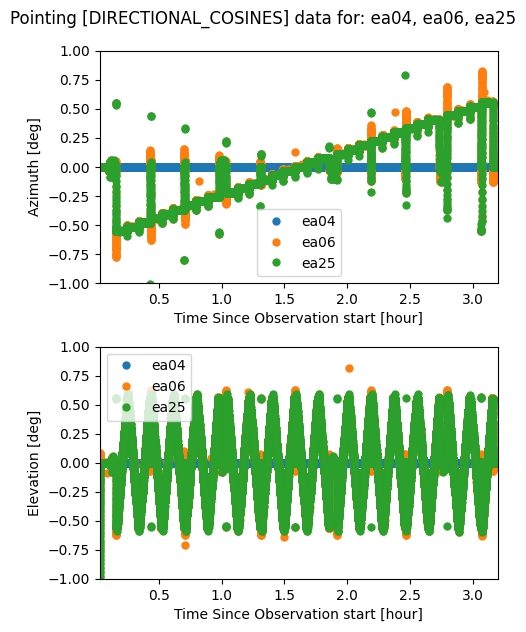
The plot_pointing_in_time method of the point_mds object is useful to compare the different pointing data variables inside each antenna pointing dataset. This comparison can be done with multiple antennas to try to identify problems, such as when a reference antenna has the wrong pointing table. It is also possible to plot each antenna in an individual plot if that is desired.
[7]:
point_mds.plot_pointing_in_time(
    point_exports,
    pointing_key='DIRECTIONAL_COSINES',
    plot_antennas_separately=False,
    display=True,
    time_scale=[0.03, 3.2],
    az_scale=[-1, 1],
    el_scale=[-1, 1])
Glancing at the array configuration
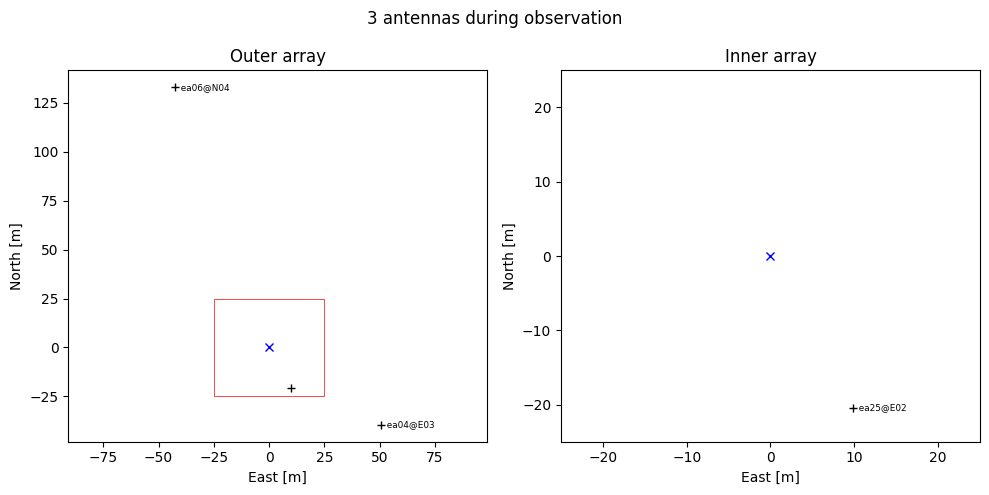
When reducing holography data it might be interesting to have a look at the array configuration, specially to choose reference antennas. The point_mds object offers a glance of the array configuration by the usage of the plot_array_configuration method.
[8]:
point_mds.plot_array_configuration(
    point_exports,
    display=True,
    box_size=50
)
Extract_holog: checking data calibration
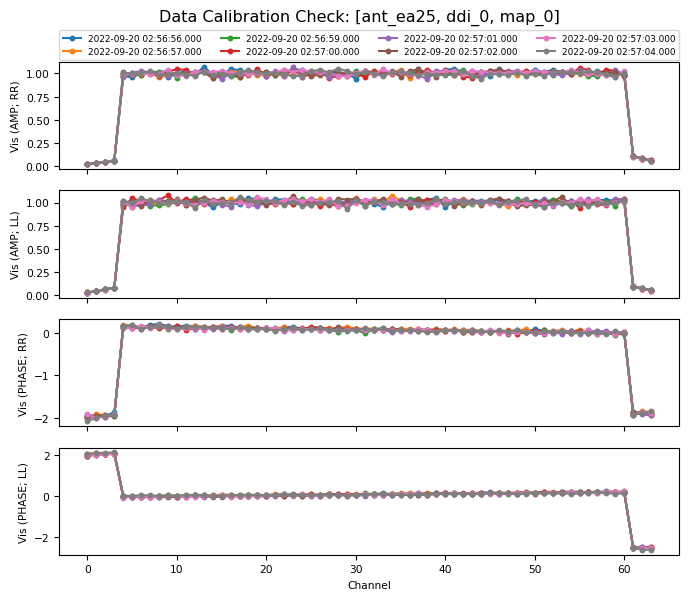
Astrohack requires the measurement set (MS) that is fed into extract_holog to be properly calibrated in CASA. To check that calibration is sound, a method has been implemented in the holog_mds class that plots the visibilities at the center of the beam.
Run extract_holog or open a holog file
Prior to plotting the diagnostic plots it is necessary to create a holog_mds object (holography Multi DataSet). This Object can be created by running extract_holog, or by opening the data products of extract_holog with the function open_holog. Here extract_holog is executed if a previously produced .holog.zarr file is not found.
[9]:
from astrohack import open_holog, extract_holog

holog_name = "data/ea25_cal_small_after_fixed.split.holog.zarr"
if os.path.exists(holog_name):
    holog_mds = open_holog(holog_name)
else:
    holog_mds = extract_holog(
        ms_name=ms_name,
        point_name=point_name,
        holog_name=holog_name,
        data_column="CORRECTED_DATA",
        parallel=parallel,
        overwrite=True,
    )
Generate holography dictionary
The function extract_holog creates a fully formed observation dictionary by default but can also take a user specified observation dictionary via the input parameter, holog_obs_dict. To help with this the user function generate_holo_obs_dict is provided to generate and return the full dictionary to the user for subselection and modification.
[10]:
from astrohack import generate_holog_obs_dict

holog_obs_dict = generate_holog_obs_dict(
    point_name=point_name,
    parallel=parallel,
)
Inspect holography dictionary
Generally the printing a nested dictionary such as the holog_obs_dict is a messy, ugly affair and for this reason a .print method has been added to the holog_obs_dict object. This method has two modes:
static mode - Static mode is a formatted string output and allows the user to define how the antenna dictionary list is handled. By adjusting the columns input variable the user can for instance take a scan list of length of 15 and display it as 3 rows of 5 columns (this would be columns=5). The reshaping code will look at the list and reshape it even if the length is not an exact split, i.e. length =17 with columns=5 would give 4 rows as output with the last row being the remainders.
dynamic mode - Dynamic mode returns a collapsible json dictionary in the cell so that the user can look at only certain parts of large holog dictionaries.
[11]:
holog_obs_dict.print(style="static")
[16:30:17] {                                                                                   holog_obs_dict.py:45
               'ddi_0': {
                   'map_0': {
                       'scans': [
                           8,
                           9,
                           10,
                           12,
                           13,
                           14,
                           16,
                           17,
                           18,
                           23,
                           24,
                           25,
                           27,
                           28,
                           29,
                           31,
                           32,
                           33,
                           38,
                           39,
                           40,
                           42,
                           43,
                           44,
                           46,
                           47,
                           48,
                           53,
                           54,
                           55,
                           57
                       ],
                       'ant': {'ea06': ['ea04'], 'ea25': ['ea04']}
                   }
               },
               'ddi_1': {
                   'map_0': {
                       'scans': [
                           8,
                           9,
                           10,
                           12,
                           13,
                           14,
                           16,
                           17,
                           18,
                           23,
                           24,
                           25,
                           27,
                           28,
                           29,
                           31,
                           32,
                           33,
                           38,
                           39,
                           40,
                           42,
                           43,
                           44,
                           46,
                           47,
                           48,
                           53,
                           54,
                           55,
                           57
                       ],
                       'ant': {'ea06': ['ea04'], 'ea25': ['ea04']}
                   }
               }
           }
[12]:
holog_obs_dict.print(style="dynamic")
[12]:
<IPython.core.display.JSON object>
Now that we have a holog_mds object we define a variable holog_exports with the name of the directory to contain our diagnostic plots. We can also inspect our holog_mds object by calling its summary method. This method lists the attributes of the holog_mds, such as the input MS and the inputs given by the user, but more important for us going forward, it also gives us a summary of the data contents in the holog_mds and its available methods, here we are going to use
the plot_diagnostics and plot_lm_sky_coverage methods.
[13]:
holog_exports = "holog_exports"
holog_mds.summary()
################################################################################
###                               Summary for:                               ###
###             data/ea25_cal_small_after_fixed.split.holog.zarr             ###
################################################################################

Data origin:
creation_time:    2026-06-08 16:29:37 MDT
creator_function: extract_holog
origin:           astrohack
version:          1.0.2

Input Parameters:
+-------------------------------+--------------------------------------------------+
| Parameter                     | Value                                            |
+-------------------------------+--------------------------------------------------+
| ant                           | all                                              |
| append                        | False                                            |
| baseline_average_distance     | all                                              |
| baseline_average_nearest      | 1                                                |
| data_column                   | CORRECTED_DATA                                   |
| ddi                           | all                                              |
| exclude_antennas              | None                                             |
| holog_name                    | data/ea25_cal_small_after_fixed.split.holog.zarr |
| holog_obs_dict                | None                                             |
| map                           | all                                              |
| ms_name                       | data/ea25_cal_small_after_fixed.split.ms         |
| overwrite                     | True                                             |
| parallel                      | True                                             |
| point_name                    | data/ea25_cal_small_after_fixed.split.point.zarr |
| pointing_interpolation_method | linear                                           |
| time_smoothing_interval       | None                                             |
+-------------------------------+--------------------------------------------------+

Available methods:
+------------------------------+-----------------------------------------------+
| Methods                      | Description                                   |
+------------------------------+-----------------------------------------------+
| add_node                     | Add a node to the data tree file structure,   |
|                              | however this node is not yet consolidated     |
|                              | into the data tree         structure,         |
|                              | consolidate must be called to integrate all   |
|                              | nodes writen by add_node onto the tree        |
|                              | structure.                                    |
| consolidate                  | Traverse own file structure on disk           |
|                              | consolidating metadata to create a unified    |
|                              | data tree entity.                             |
| create_from_input_parameters | Create an AstrohackBaseFile object from a     |
|                              | filename and initializes xdtree root          |
|                              | attributes.                                   |
| export_to_aips               | Export data compatible to AIPS's HOLOG task   |
| is_close_to                  | Tests if self and other_mds are close to each |
|                              | other.                                        |
| items                        | Get children items                            |
| keys                         | Get children keys                             |
| observation_summary          | Create a Summary of observation information   |
| open                         | Open Base file.                               |
| plot_diagnostics             | Plot diagnostic calibration plots from the    |
|                              | holography data file.                         |
| plot_lm_sky_coverage         | Plot directional cosine coverage.             |
| summary                      | Prints summary of this Astrohack File object, |
|                              | with available data, attributes and methods   |
| values                       | Get children values                           |
| write                        | Write mds to disk by saving the data tree to  |
|                              | a file                                        |
+------------------------------+-----------------------------------------------+

Data Contents:
+----------+-------+-----------+
| Antenna  | DDI   | Mapping   |
+----------+-------+-----------+
| ant_ea06 | ddi_0 | ['map_0'] |
| ant_ea06 | ddi_1 | ['map_0'] |
| ant_ea25 | ddi_0 | ['map_0'] |
| ant_ea25 | ddi_1 | ['map_0'] |
+----------+-------+-----------+
Calibration diagnostic plots
Below is a call to plot_diagnostics, we limit our plotting to only DDI 0 of antenna ea25 for simplicity. The plot shown here displays the Amplitudes and phases for RR and LL correlations at the beam center for all channels. With this plot we want to make sure that the Amplitudes remain close to 1, and that the phase remains close to 0. The data displayed here is well calibrated but displays the Gibbs phenomenon at the band edges which is normal.
[14]:
holog_mds.plot_diagnostics(
    holog_exports,  # Directory to contain the plots
    ant="ea25",  # Plotting antenna ea25
    ddi=0,  # Plotting DDI 0
    map_id="all",  # Plotting all mappings
    complex_split="polar",  # Split complex data to polar (amplitude + phase)
    display=True,  # Display results in Notebook cell
    parallel=False,  # Don't plots in parallel
)
Below we call plot_diagnostics again but this time over all the antennas and DDIs in the holog_mds. As before the created plots are stored in holog_exports but this time they are not displayed for brevity. All the files created by plot_diagnostics can be seen just after its execution.
[15]:
holog_mds.plot_diagnostics(
    holog_exports,  # Directory to contain the plots
    ant="all",  # Plotting all antennas
    ddi="all",  # Plotting all DDIs
    map_id="all",  # Plotting all mappings
    complex_split="cartesian",  # Split complex data to cartesian (real + imaginary)
    display=False,  # don't display results in Notebook cell
    parallel=parallel,  # Do plots in parallel
)

# All exported files
print("\nCreated files:")

list_directory_files(holog_exports + "/holog_diagnostics*.png")
Created files:
holog_exports/holog_diagnostics_ant_ea06_ddi_0_map_0.png
holog_exports/holog_diagnostics_ant_ea25_ddi_0_map_0.png
holog_exports/holog_diagnostics_ant_ea06_ddi_1_map_0.png
holog_exports/holog_diagnostics_ant_ea25_ddi_1_map_0.png
Directional cosines sky coverage
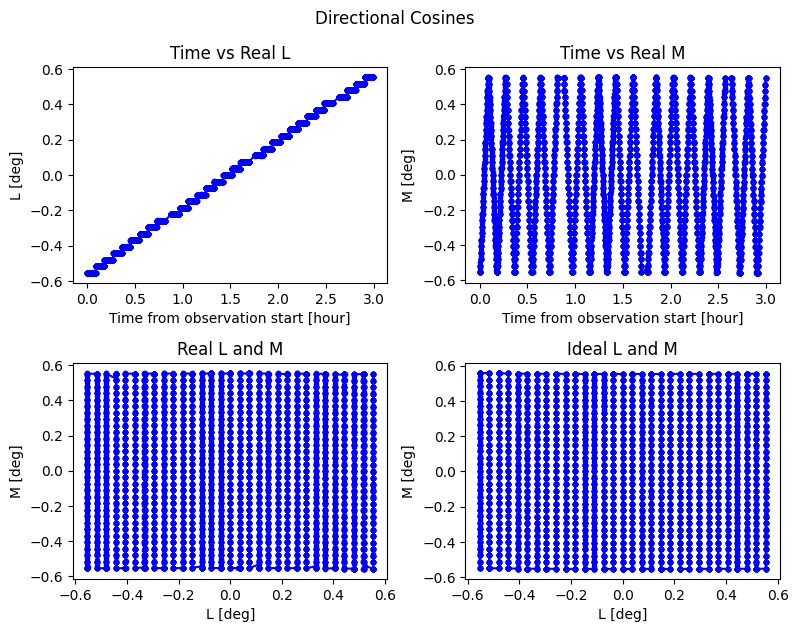
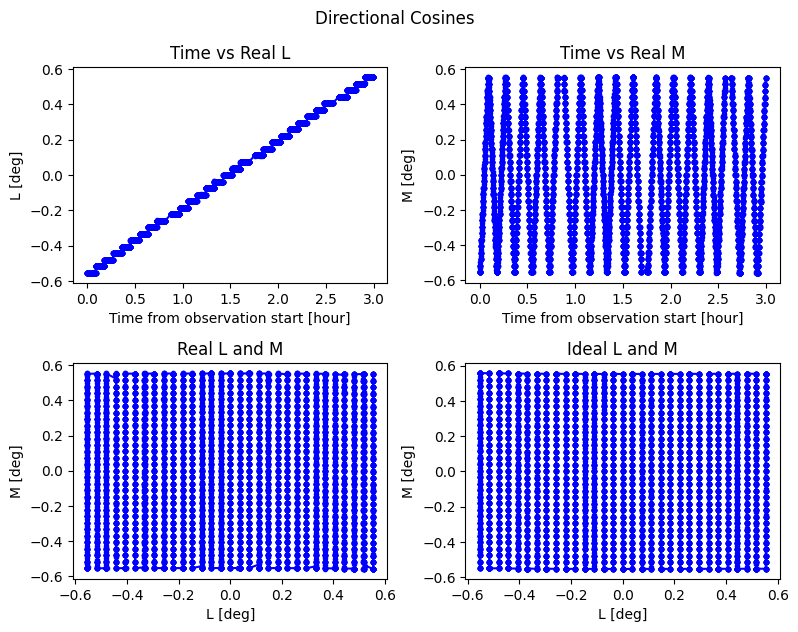
Below is a call to plot_lm_sky_coverage, we limit our plotting to only DDI 0 of antenna ea25 for simplicity. The plot shown here displays the sky coverage of the L and M axes. Also displayed are the Amplitudes and phases for the RR correlation as a function of the L, M and time axes. These plots help us in identifying problems with the pointing data in the MS, and or problems in the visibility data that vary with the L, M or time axes.
[16]:
holog_mds.plot_lm_sky_coverage(
    holog_exports,  # Directory to contain the plots
    ant="ea25",  # Plotting antenna ea25
    ddi=0,  # Plotting DDI 0
    map_id="all",  # Plotting all mappings
    angle_unit="deg",  # Unit for L and M axes
    time_unit="hour",  # Time unit
    plot_correlation="RR",  # Which correlation to be plotted
    complex_split="polar",  # Split complex data to polar (Amplitude + phase)
    phase_unit="deg",  # Unit for phase
    display=True,  # Display plots bellow
    parallel=False,  # Do not do plots in parallel
)
Below we call plot_lm_sky_coverage again but this time over all the antennas and DDIs in the holog_mds. As before the created plots are stored in holog_exports but this time they are not displayed for brevity. All the files created by plot_lm_sky_coverage can be seen just after its execution.
[17]:
holog_mds.plot_lm_sky_coverage(
    holog_exports,  # Directory to contain the plots
    ant="all",  # Plotting all antennas
    ddi="all",  # Plotting all DDIs
    map_id="all",  # Plotting all mappings
    angle_unit="deg",  # Unit for L and M axes
    time_unit="hour",  # Time unit
    plot_correlation="all",  # Plot all correlations
    complex_split="polar",  # Split complex data to cartesian (real + imaginary)
    phase_unit="deg",  # Unit for phase
    display=False,  # Do not display plots bellow
    parallel=parallel,  # Do plots in parallel
)

# All exported files
print("\nCreated files:")

list_directory_files(holog_exports + "/holog_directional_cosines*.png")
Created files:
holog_exports/holog_directional_cosines_RR_ant_ea06_ddi_1_map_0.png
holog_exports/holog_directional_cosines_LR_ant_ea25_ddi_0_map_0.png
holog_exports/holog_directional_cosines_ant_ea25_ddi_1_map_0.png
holog_exports/holog_directional_cosines_LR_ant_ea06_ddi_0_map_0.png
holog_exports/holog_directional_cosines_ant_ea06_ddi_1_map_0.png
holog_exports/holog_directional_cosines_RR_ant_ea25_ddi_1_map_0.png
holog_exports/holog_directional_cosines_RR_ant_ea06_ddi_0_map_0.png
holog_exports/holog_directional_cosines_LR_ant_ea25_ddi_1_map_0.png
holog_exports/holog_directional_cosines_ant_ea25_ddi_0_map_0.png
holog_exports/holog_directional_cosines_LR_ant_ea06_ddi_1_map_0.png
holog_exports/holog_directional_cosines_ant_ea06_ddi_0_map_0.png
holog_exports/holog_directional_cosines_RR_ant_ea25_ddi_0_map_0.png
holog_exports/holog_directional_cosines_LL_ant_ea06_ddi_1_map_0.png
holog_exports/holog_directional_cosines_RL_ant_ea25_ddi_0_map_0.png
holog_exports/holog_directional_cosines_RL_ant_ea06_ddi_0_map_0.png
holog_exports/holog_directional_cosines_LL_ant_ea25_ddi_1_map_0.png
holog_exports/holog_directional_cosines_LL_ant_ea06_ddi_0_map_0.png
holog_exports/holog_directional_cosines_RL_ant_ea25_ddi_1_map_0.png
holog_exports/holog_directional_cosines_RL_ant_ea06_ddi_1_map_0.png
holog_exports/holog_directional_cosines_LL_ant_ea25_ddi_0_map_0.png
Holog: Checking beam and aperture quality and exporting data to FITS files
After we are sure about the quality of the calibrated data in the MS we want to make sure that the beam is well sampled and behaved and that the apertures are well characterized and have enough resolution. For that we are going to use the methods of the image_mds object, i.e. the data product of the holog function.
Run holog or open image file
Like before with the .holog.zarr file, if the .image.zarr is available we simply open it with open_image, otherwise we run holog to obtain our image_mds object.
[18]:
import os
from astrohack import holog, open_image

image_name = "data/ea25_cal_small_after_fixed.split.image.zarr"

if os.path.exists(image_name):
    image_mds = open_image(image_name)
else:
    image_mds = holog(
        holog_name=holog_name,
        image_name=image_name,
        overwrite=True,
        phase_fit_engine="perturbations",
        to_stokes=True,
        parallel=parallel,
    )
Now that we have a image_mds object we define a variable called image_exports with the name of the directory to contain our plots and exported FITS files. We can also inspect our image_mds object by calling its summary method. Like for the holog_mds object, this method lists the attributes of the image_mds, such as the input .holog.zarr file and the inputs given by the user, like before we are actually interested on the data contents and the available methods. For
this tutorial the relevant methods are plot_beams, plot_apertures and export_to_fits.
[19]:
image_exports = "image_exports"
image_mds.summary()
################################################################################
###                               Summary for:                               ###
###             data/ea25_cal_small_after_fixed.split.image.zarr             ###
################################################################################

Data origin:
creation_time:    2026-06-08 16:29:40 MDT
creator_function: holog
origin:           astrohack
version:          1.0.2

Input Parameters:
+-------------------------+--------------------------------------------------+
| Parameter               | Value                                            |
+-------------------------+--------------------------------------------------+
| alma_osf_pad            | None                                             |
| ant                     | all                                              |
| cell_size               | None                                             |
| chan_average            | True                                             |
| chan_tolerance_factor   | 0.005                                            |
| ddi                     | all                                              |
| grid_interpolation_mode | gaussian                                         |
| grid_size               | None                                             |
| holog_name              | data/ea25_cal_small_after_fixed.split.holog.zarr |
| image_name              | data/ea25_cal_small_after_fixed.split.image.zarr |
| overwrite               | True                                             |
| padding_factor          | 10                                               |
| parallel                | True                                             |
| phase_fit_control       | [True, True, True, True, True]                   |
| phase_fit_engine        | perturbations                                    |
| scan_average            | True                                             |
| to_stokes               | True                                             |
| zernike_n_order         | 4                                                |
+-------------------------+--------------------------------------------------+

Available methods:
+------------------------------+-----------------------------------------------+
| Methods                      | Description                                   |
+------------------------------+-----------------------------------------------+
| add_node                     | Add a node to the data tree file structure,   |
|                              | however this node is not yet consolidated     |
|                              | into the data tree         structure,         |
|                              | consolidate must be called to integrate all   |
|                              | nodes writen by add_node onto the tree        |
|                              | structure.                                    |
| consolidate                  | Traverse own file structure on disk           |
|                              | consolidating metadata to create a unified    |
|                              | data tree entity.                             |
| create_from_input_parameters | Create an AstrohackBaseFile object from a     |
|                              | filename and initializes xdtree root          |
|                              | attributes.                                   |
| export_phase_fit_results     | Export perturbations phase fit results from   |
|                              | the data in an AstrohackImageFIle object to   |
|                              | ASCII files.                                  |
| export_to_fits               | Export contents of an AstrohackImageFile      |
|                              | object to several FITS files in the           |
|                              | destination folder                            |
| export_zernike_fit_results   | Export Zernike coefficients from the data in  |
|                              | an AstrohackImageFIle object to ASCII files.  |
| is_close_to                  | Tests if self and other_mds are close to each |
|                              | other.                                        |
| items                        | Get children items                            |
| keys                         | Get children keys                             |
| observation_summary          | Create a Summary of observation information   |
| open                         | Open Base file.                               |
| plot_apertures               | Aperture amplitude and phase plots from the   |
|                              | data in an AstrohackImageFIle object.         |
| plot_beams                   | Beam plots from the data in an                |
|                              | AstrohackImageFIle object.                    |
| plot_zernike_model           | Plot Zernike models from the data in an       |
|                              | AstrohackImageFile object.                    |
| summary                      | Prints summary of this Astrohack File object, |
|                              | with available data, attributes and methods   |
| values                       | Get children values                           |
| write                        | Write mds to disk by saving the data tree to  |
|                              | a file                                        |
+------------------------------+-----------------------------------------------+

Data Contents:
+----------+--------------------+
| Antenna  | DDI                |
+----------+--------------------+
| ant_ea06 | ['ddi_0', 'ddi_1'] |
| ant_ea25 | ['ddi_0', 'ddi_1'] |
+----------+--------------------+
Plotting beams
Here we make a call to plot_beams to plot the beam for a single antenna and DDI for brevity. These plots tell us about the shape of the beam, i.e. is it circular? is it smeared?
[20]:
image_mds.plot_beams(
    image_exports,  # Directory to contain the plots
    ant="ea25",  # Plotting antenna ea25
    ddi=0,  # Plotting DDI 0
    display=True,  # Display plots below
    angle_unit="amin",  # Unit for L and M axes
    complex_split="polar",  # Plot amplitude and phase
    phase_unit="deg",  # Unit for phase
    parallel=False,  # Don't do plots in parallel
)
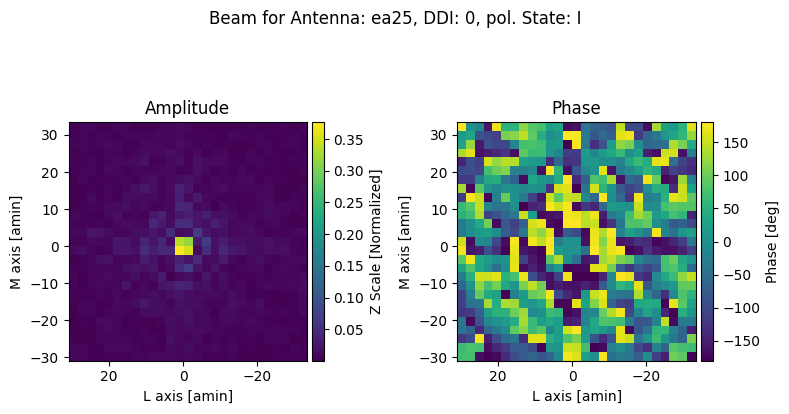
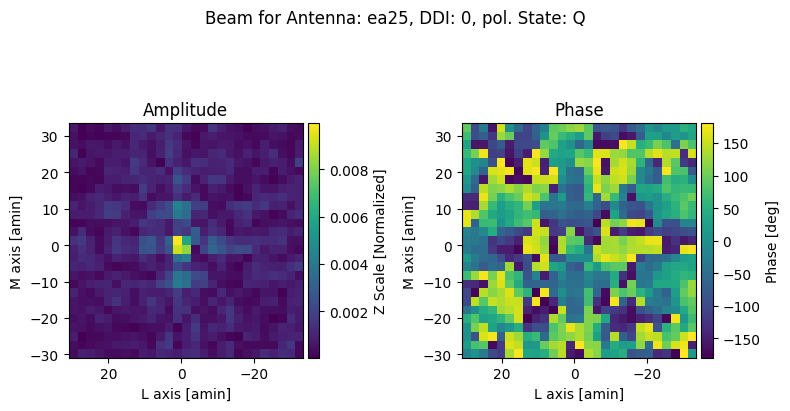
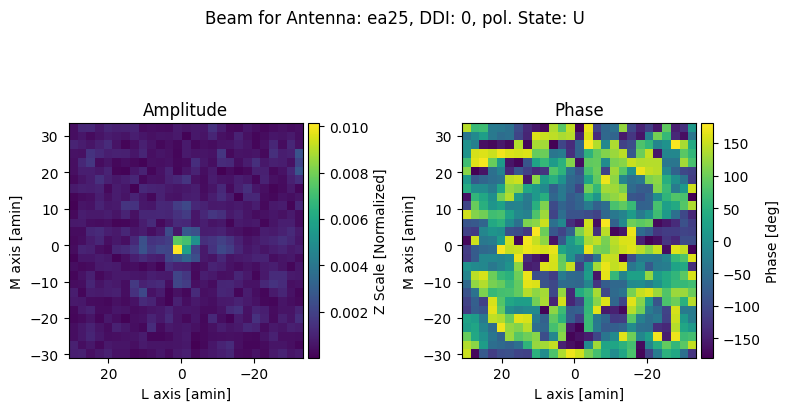
Here we call again plot_beams, this time over all the Antennas and the DDIs in the image_mds. For brevity the plots are not displayed, but a list of the files created is displayed just after the execution of plot_beams
[21]:
image_mds.plot_beams(
    image_exports,  # Directory to contain the plots
    ant="all",  # Plotting all antennas
    ddi="all",  # Plotting all DDIs
    display=False,  # Don't display plots below
    complex_split="polar",  # Plot amplitude and phase
    parallel=parallel,  # Do plots in parallel
)

# All exported files
print("\nCreated files:")

list_directory_files(image_exports + "/image_beam*.png")
Created files:
image_exports/image_beam_polar_ant_ea06_ddi_1_pol_I.png
image_exports/image_beam_polar_ant_ea25_ddi_1_pol_I.png
image_exports/image_beam_polar_ant_ea06_ddi_0_pol_I.png
image_exports/image_beam_polar_ant_ea25_ddi_0_pol_I.png
image_exports/image_beam_polar_ant_ea25_ddi_0_pol_Q.png
image_exports/image_beam_polar_ant_ea06_ddi_0_pol_U.png
image_exports/image_beam_polar_ant_ea06_ddi_0_pol_V.png
image_exports/image_beam_polar_ant_ea25_ddi_0_pol_V.png
image_exports/image_beam_polar_ant_ea06_ddi_0_pol_Q.png
image_exports/image_beam_polar_ant_ea25_ddi_0_pol_U.png
image_exports/image_beam_polar_ant_ea25_ddi_1_pol_Q.png
image_exports/image_beam_polar_ant_ea06_ddi_1_pol_U.png
image_exports/image_beam_polar_ant_ea06_ddi_1_pol_V.png
image_exports/image_beam_polar_ant_ea25_ddi_1_pol_V.png
image_exports/image_beam_polar_ant_ea06_ddi_1_pol_Q.png
image_exports/image_beam_polar_ant_ea25_ddi_1_pol_U.png
Plotting apertures
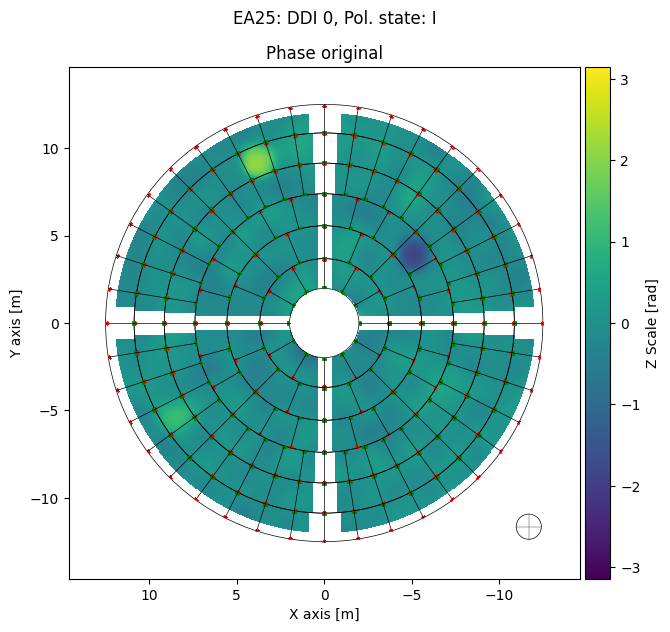
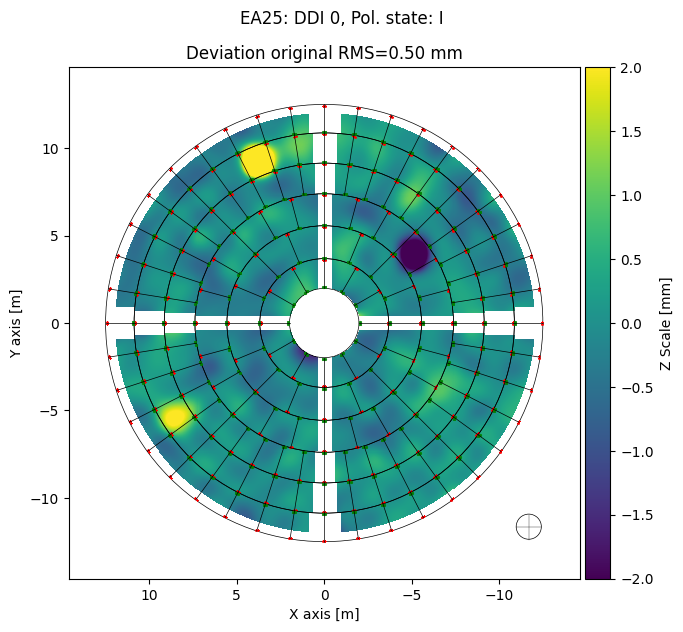
Apertures are the final product of holog and are the data that is used by panel to compute the screw adjustments. Before proceeding to panel we may want to inspect the amplitude and phase maps of the apertures. Specifically the amplitude map may be used to estimate the value of the cutoff parameter of panel. In our first call to plot_apertures we are going to use a single antenna and DDI for display, followed by a call that goes over all antennas and DDIs and lists the
created files.
[22]:
import numpy as np

image_mds.plot_apertures(
    image_exports,  # Directory to contain the plots
    ant="ea25",  # Plotting antenna ea25
    ddi=0,  # Plotting DDI 0
    polarization_state="I",  # Plot only Stokes I aperture
    plot_screws=True,  # Plotting screw positions
    phase_unit="rad",  # Plotting phase as radians, degrees also possible (deg)
    phase_limits=[-np.pi, np.pi],  # Plotting from -pi to pi
    deviation_unit="mm",  # Plotting deviation as mm, all length units available
    deviation_limits=[-2, 2],  # Plotting from -2 to 2 mm
    display=True,  # Display plots below
    parallel=False,  # Don't do plots in parallel
)
[23]:
image_mds.plot_apertures(
    image_exports,  # Directory to contain the plots
    ant="all",  # Plotting all antennas
    ddi="all",  # Plotting all DDIs
    plot_screws=True,  # Plotting screw positions
    display=False,  # Don't display plots below
    parallel=parallel,  # Do plots in parallel
)

# List All exported files
print("\nCreated files:")

list_directory_files(image_exports + "/image_amplitude*.png")
list_directory_files(image_exports + "/image_corrected*.png")
Created files:
Exporting image data to FITS
Sometimes it can be interesting to work with the data produced by holog in another astronomical software package such as astropy or carta. For this purpose we have introduced the method export_to_fits to the image_mds object. The FITS created by this routine encompass all the data arrays contained in each xarray dataset of the image_mds. After the execution of export_to_fits we display the list of created files and the header of one of the created files.
[24]:
image_mds.export_to_fits(
    image_exports,  # Directory to contain FITS files
    complex_split="cartesian",  # Data will be split into real and imaginary FITS files
    ant="all",  # Export all antennas
    ddi="all",  # Export all DDIs
    parallel=parallel,  # Export FITS files in parallel
)

# All exported files
print("\nCreated files:")

list_directory_files(image_exports + "/image*.fits")
[2026-06-08 16:30:37,723]     INFO    worker_1:  Exporting image contents of ant_ea25 ddi_1 to FITS files in image_exports
[2026-06-08 16:30:37,725]     INFO    worker_2:  Exporting image contents of ant_ea06 ddi_1 to FITS files in image_exports
[2026-06-08 16:30:37,729]     INFO    worker_0:  Exporting image contents of ant_ea25 ddi_0 to FITS files in image_exports
[2026-06-08 16:30:37,730]     INFO    worker_3:  Exporting image contents of ant_ea06 ddi_0 to FITS files in image_exports

Created files:
image_exports/image_aperture_imag_ant_ea06_ddi_1.fits
image_exports/image_corrected_phase_ant_ea25_ddi_1.fits
image_exports/image_aperture_imag_ant_ea25_ddi_0.fits
image_exports/image_corrected_phase_ant_ea06_ddi_0.fits
image_exports/image_corrected_phase_ant_ea06_ddi_1.fits
image_exports/image_aperture_imag_ant_ea25_ddi_1.fits
image_exports/image_corrected_phase_ant_ea25_ddi_0.fits
image_exports/image_aperture_imag_ant_ea06_ddi_0.fits
image_exports/image_beam_imag_ant_ea25_ddi_1.fits
image_exports/image_beam_imag_ant_ea06_ddi_0.fits
image_exports/image_beam_imag_ant_ea06_ddi_1.fits
image_exports/image_beam_imag_ant_ea25_ddi_0.fits
image_exports/image_aperture_real_ant_ea06_ddi_0.fits
image_exports/image_aperture_real_ant_ea25_ddi_1.fits
image_exports/image_aperture_real_ant_ea25_ddi_0.fits
image_exports/image_aperture_real_ant_ea06_ddi_1.fits
image_exports/image_beam_real_ant_ea25_ddi_0.fits
image_exports/image_beam_real_ant_ea06_ddi_1.fits
image_exports/image_beam_real_ant_ea06_ddi_0.fits
image_exports/image_beam_real_ant_ea25_ddi_1.fits
[25]:
# Antenna ea06 DDI 0 aperture real FITS header
from astropy.io import fits

hdul = fits.open(image_exports + "/image_aperture_real_ant_ea06_ddi_0.fits")
print(repr(hdul[0].header))
SIMPLE  =                    T / conforms to FITS standard
BITPIX  =                  -64 / array data type
NAXIS   =                    4 / number of array dimensions
NAXIS1  =                  512
NAXIS2  =                  512
NAXIS3  =                    1
NAXIS4  =                    4
EXTEND  =                    T
STOKES  = 'I, Q, U, V'
WAVELENG= 0.021161322651231735
FREQUENC=        14167000000.0
TELESCOP= 'ea06    '
INSTRUME= 'VLA     '
TIME_CEN=    5170359447.000001
PADDING =                   10
GRD_INTR= 'gaussian'
CHAN_AVE= 'yes     '
CHAN_TOL=                0.005
SCAN_AVE= 'yes     '
TO_STOKE= 'yes     '
WCSAXES =                    4
CRVAL3  =                  0.0
CDELT3  =        14167000000.0
CRPIX3  =                  0.0
CROTA3  =                  0.0
CTYPE3  = 'Frequency'
CUNIT3  = 'Hz      '
CRVAL4  =                  1.0
CDELT4  =                  1.0
CRPIX4  =                  1.0
CROTA4  =                  0.0
CTYPE4  = 'STOKES  '
CUNIT4  = ''
CRVAL1  = 0.000607804533870422
CDELT1  = -0.00121560906774081
CRPIX1  =                256.0
CROTA1  =                  0.0
CTYPE1  = 'X----LIN'
CUNIT1  = 'm       '
CRVAL2  = 0.000607804533870422
CDELT2  = -0.00121560906774081
CRPIX2  =                256.0
CROTA2  =                  0.0
CTYPE2  = 'Y----LIN'
CUNIT2  = 'm       '
BMAJ    =  0.05744485294117574
BMIN    = -0.05744485294117574
BPA     =                 90.0
BUNIT   = 'Normalized'
TYPE    = 'Complex aperture real part'
ORIGIN  = 'Astrohack v1.0.2: image'
DATE    = 'Jun 08 2026, 16:30:37'
Zernike polynomials fitting results
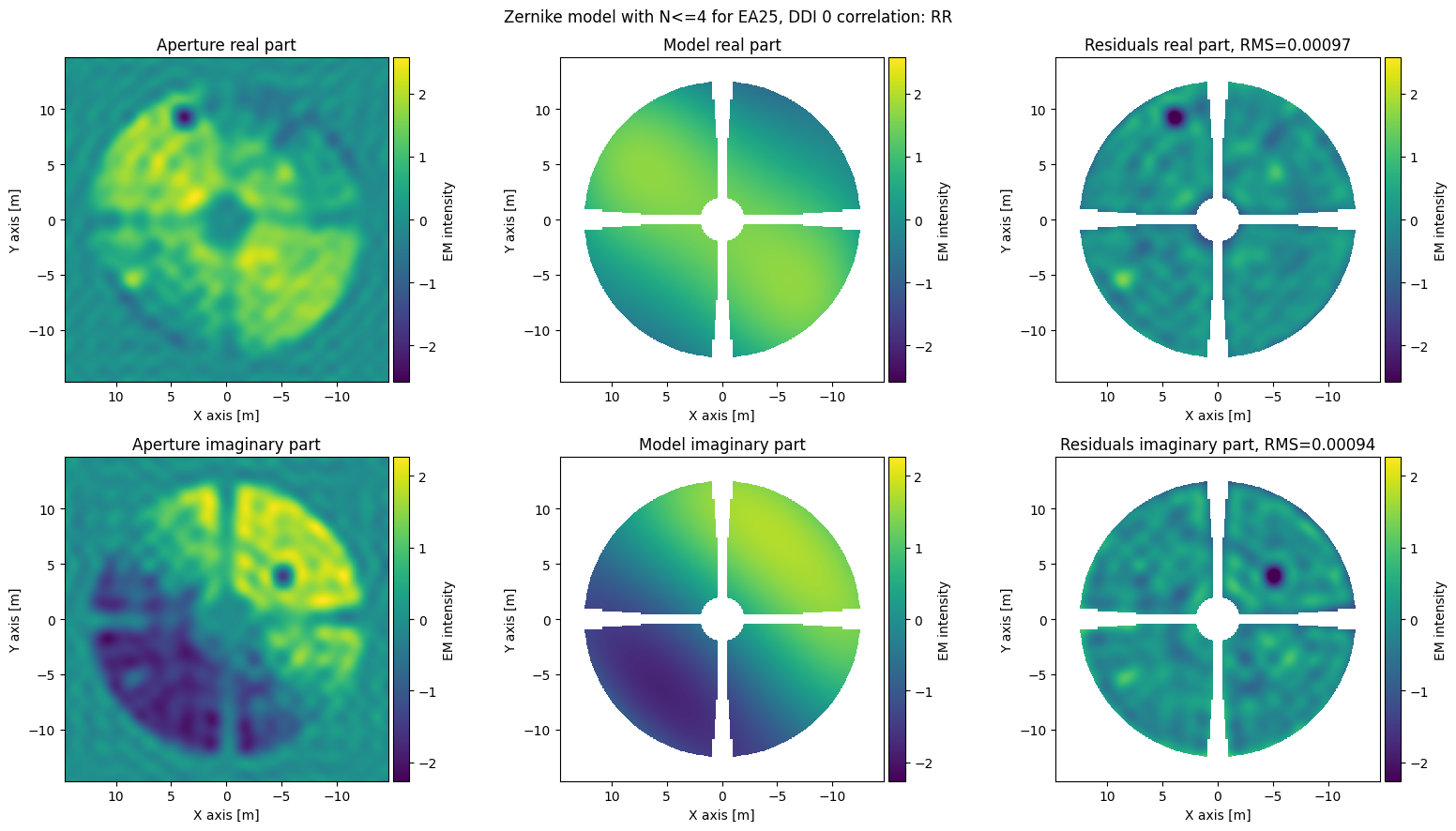
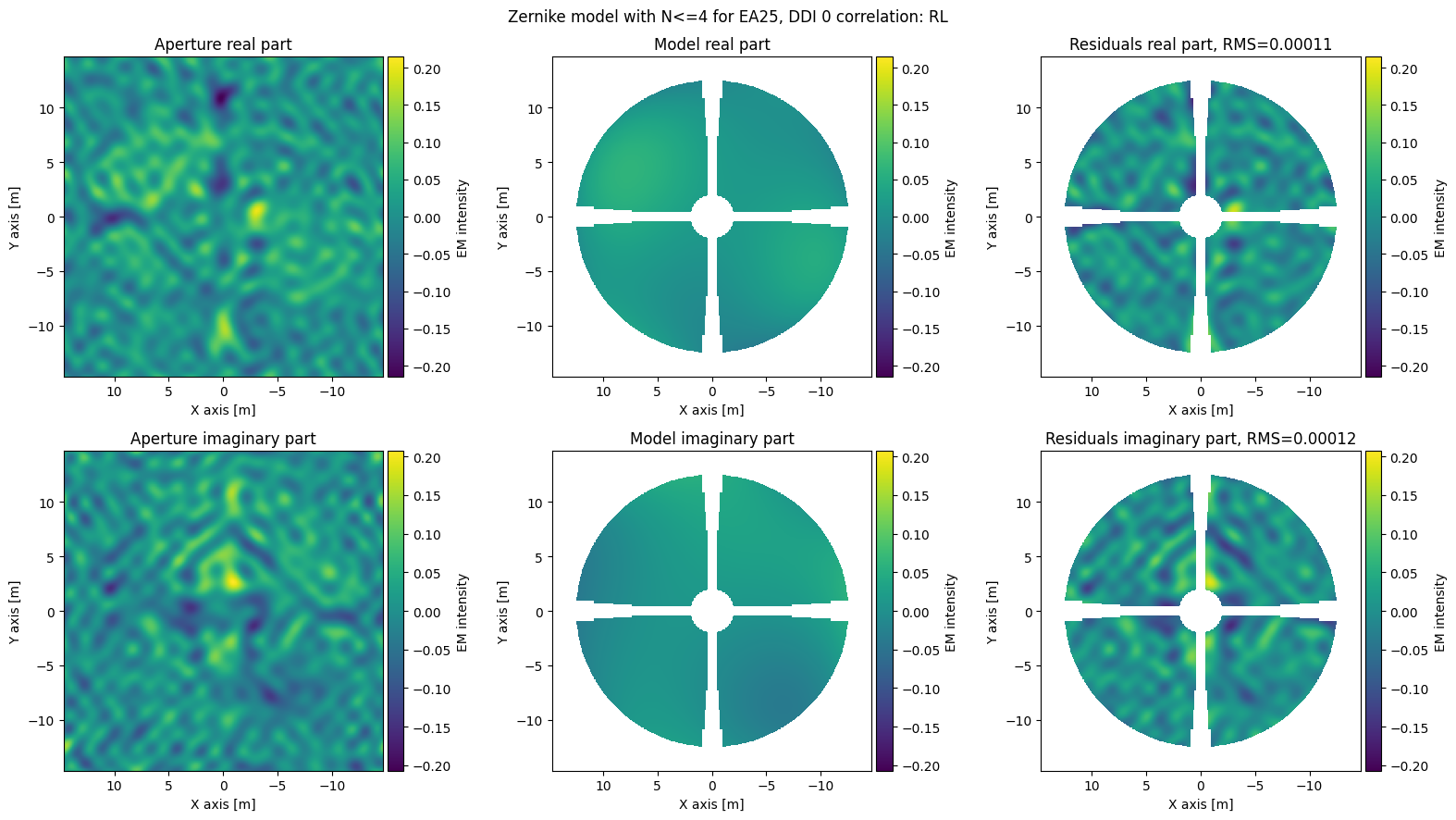
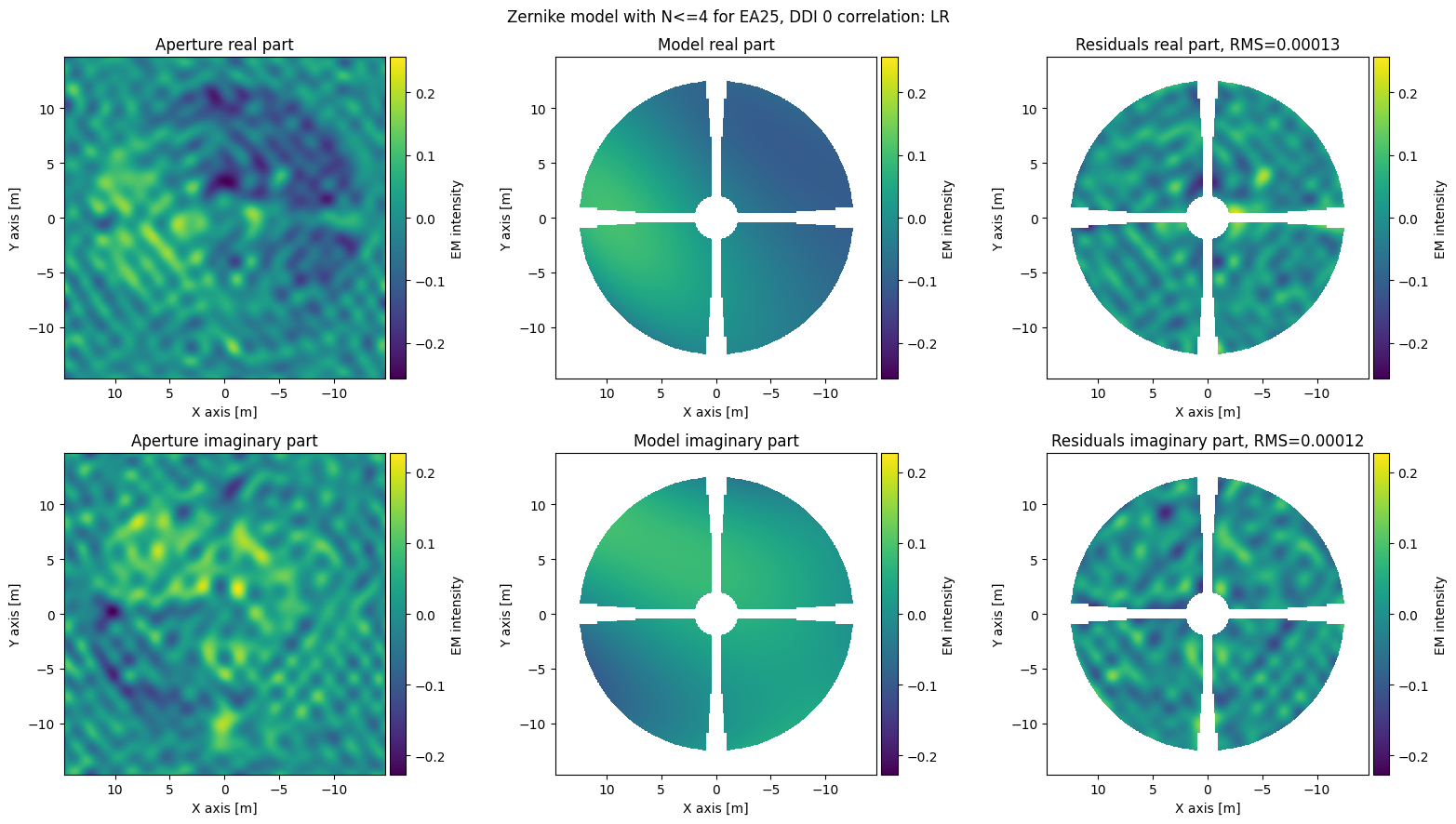
Understanding the features that appear in an Aperture image may be daunting, in such cases one convenient way to analyze an aperture is to decompose it using Zernike polynomials. Some of the information that can be gleaned from the Zernike polynomials coefficients is the presence of a phase ramp or if the holography was obtained out of focus or even the astigmatism of the telescope. One other use of Zernike polynomial decomposition is to
model the beams when deconvolving sky images using A projection. astrohack.holog fits the apertures with Zernike polynomials up to an order set with the zernike_N_order parameter. To visualize the results from this fitting there are two methods of the image_mds object, export_zernike_fit_results which export the Zernike polynomials coefficients to a text file and plot_zernike_model that plots the Zernike models together with the Aperture and the fitting results.
[26]:
image_mds.export_zernike_fit_results(image_exports, ant="all", ddi="all", parallel=parallel)

print("\nCreated files:\n")
list_directory_files(image_exports + "/image_zernike*.txt")

print("\nExample File:\n")
display_text_file(image_exports + "/image_zernike_fit_ant_ea25_ddi_0.txt", nlines=22)
Created files:

image_exports/image_zernike_fit_ant_ea25_ddi_1.txt
image_exports/image_zernike_fit_ant_ea25_ddi_0.txt
image_exports/image_zernike_fit_ant_ea06_ddi_1.txt
image_exports/image_zernike_fit_ant_ea06_ddi_0.txt

Example File:

* map 0, Frequency 14.1670 GHz, Correlation RR:
   Fit RMS = 0.00097177 + 0.00093742*i

+-----------+-------------+-------------+
| Indices   |     Real    |  Imaginary  |
+-----------+-------------+-------------+
| N=0, M=0  |  0.29654298 |  0.01918599 |
| N=1, M=-1 | -0.07142550 |  0.76368865 |
| N=1, M=1  | -0.24968576 |  1.50688576 |
| N=2, M=-2 | -0.43299233 | -0.02125748 |
| N=2, M=0  | -0.27774335 |  0.01559826 |
| N=2, M=2  |  0.11810537 |  0.00616394 |
| N=3, M=-3 |  0.04273706 | -0.13933120 |
| N=3, M=-1 |  0.00553100 | -0.25156413 |
| N=3, M=1  | -0.09623912 |  0.17022226 |
| N=3, M=3  |  0.14572524 | -0.54838582 |
| N=4, M=-4 |  0.01290425 | -0.00773214 |
| N=4, M=-2 |  0.09770843 |  0.04968150 |
| N=4, M=0  |  0.03058520 | -0.00538474 |
| N=4, M=2  |  0.00845229 | -0.00032249 |
| N=4, M=4  | -0.01276903 | -0.02132567 |
+-----------+-------------+-------------+
[27]:
image_mds.plot_zernike_model(
    image_exports,
    ant="ea25",
    ddi="0",
    display=True,
)
[28]:
image_mds.plot_zernike_model(
    image_exports, ant="all", ddi="all", display=False, parallel=parallel
)
print("\nCreated files:\n")

list_directory_files(image_exports + "/image_zernike*.png")
Created files:

image_exports/image_zernike_model_ant_ea06_ddi_0_corr_LL.png
image_exports/image_zernike_model_ant_ea25_ddi_0_corr_RR.png
image_exports/image_zernike_model_ant_ea06_ddi_1_corr_RR.png
image_exports/image_zernike_model_ant_ea25_ddi_1_corr_LL.png
image_exports/image_zernike_model_ant_ea25_ddi_0_corr_LR.png
image_exports/image_zernike_model_ant_ea06_ddi_0_corr_RL.png
image_exports/image_zernike_model_ant_ea25_ddi_1_corr_RL.png
image_exports/image_zernike_model_ant_ea06_ddi_1_corr_LR.png
image_exports/image_zernike_model_ant_ea25_ddi_0_corr_LL.png
image_exports/image_zernike_model_ant_ea06_ddi_0_corr_RR.png
image_exports/image_zernike_model_ant_ea25_ddi_1_corr_RR.png
image_exports/image_zernike_model_ant_ea06_ddi_1_corr_LL.png
image_exports/image_zernike_model_ant_ea06_ddi_0_corr_LR.png
image_exports/image_zernike_model_ant_ea25_ddi_0_corr_RL.png
image_exports/image_zernike_model_ant_ea06_ddi_1_corr_RL.png
image_exports/image_zernike_model_ant_ea25_ddi_1_corr_LR.png
Exporting phase fit results from image data
Sometimes it is important to understand what came of the phase fitting during the imaging process. This can be done using the export_phase_fit_results method of the image_mds objects.
[29]:
image_mds.export_phase_fit_results(
    image_exports,  # Directory to contain phase fit results
    ant="all",  # Export all antennas
    ddi="all",  # Export all DDIs
    parallel=parallel,  # Export ASCII files in parallel
)
display_text_file(image_exports + "/image_phase_fit_ant_ea25_ddi_0.txt")
* map 0, Frequency 14.1670 GHz, polarization state I:

 +---------------------+----------------+------+
| Parameter           |          Value | Unit |
+---------------------+----------------+------+
| Phase offset        |     0.24 ± 0.0 | deg  |
| X point offset      |      0.0 ± 0.0 | deg  |
| Y point offset      | 0.000267 ± 0.0 | deg  |
| X focus offset      |    -0.62 ± 0.0 |  mm  |
| Y focus offset      |     -1.9 ± 0.0 |  mm  |
| Z focus offset      |    0.081 ± 0.0 |  mm  |
| X subreflector tilt | 0.000107 ± 0.0 | deg  |
| Y subreflector tilt |  0.00045 ± 0.0 | deg  |
| X cassegrain offset |    -31.0 ± 0.0 |  mm  |
| Y cassegrain offset |    -28.0 ± 0.0 |  mm  |
+---------------------+----------------+------+
Panel: screw adjustments, plotting residuals corrections and exporting data to FITS
If we are sure about the quality of the data we can now proceed to getting screw adjustments and evaluating the surface provided by these adjustments. For that we are going to use the methods of the panel_mds object, i.e. the data product of the panel function.
Run panel or open panel file
Here we check for the existence of a .panel.zarr file, if it does not exist we run panel, if it exists we open it with open_panel.
[30]:
import os
from astrohack import panel, open_panel

panel_name = "data/ea25_cal_small_after_fixed.split.panel.zarr"

if os.path.exists(panel_name):
    panel_mds = open_panel(panel_name)

else:
    panel_mds = panel(
        image_name=image_name,
        panel_name=panel_name,
        panel_model="rigid",
        panel_margins=0.2,
        clip_type="relative",
        clip_level=0.2,
        overwrite=True,
        parallel=parallel,
    )
With the panel_mds in hands we can now explore its contents. As before we define a variable, this time called panel_exports, with the name of the directory to contain the exported products and, we call the summary method to see the list of contents and available methods. In this tutorial we will cover the methods: plot_antennas, export_screws and export_to_fits.
[31]:
panel_exports = "panel_exports"
panel_mds.summary()
################################################################################
###                               Summary for:                               ###
###             data/ea25_cal_small_after_fixed.split.panel.zarr             ###
################################################################################

Data origin:
creation_time:    2026-06-08 16:29:44 MDT
creator_function: panel
origin:           astrohack
version:          1.0.2

Input Parameters:
+--------------------+--------------------------------------------------+
| Parameter          | Value                                            |
+--------------------+--------------------------------------------------+
| ant                | all                                              |
| clip_level         | 0.2                                              |
| clip_type          | relative                                         |
| ddi                | all                                              |
| image_name         | data/ea25_cal_small_after_fixed.split.image.zarr |
| overwrite          | True                                             |
| panel_margins      | 0.2                                              |
| panel_model        | rigid                                            |
| panel_name         | data/ea25_cal_small_after_fixed.split.panel.zarr |
| parallel           | True                                             |
| polarization_state | I                                                |
| use_detailed_mask  | True                                             |
+--------------------+--------------------------------------------------+

Available methods:
+------------------------------+-----------------------------------------------+
| Methods                      | Description                                   |
+------------------------------+-----------------------------------------------+
| add_node                     | Add a node to the data tree file structure,   |
|                              | however this node is not yet consolidated     |
|                              | into the data tree         structure,         |
|                              | consolidate must be called to integrate all   |
|                              | nodes writen by add_node onto the tree        |
|                              | structure.                                    |
| consolidate                  | Traverse own file structure on disk           |
|                              | consolidating metadata to create a unified    |
|                              | data tree entity.                             |
| create_from_input_parameters | Create an AstrohackBaseFile object from a     |
|                              | filename and initializes xdtree root          |
|                              | attributes.                                   |
| export_gain_tables           | Compute estimated antenna gains in dB and     |
|                              | saves them to ASCII files.                    |
| export_screws                | Export screw adjustments to text files and    |
|                              | optionally plots.                             |
| export_to_fits               | Export contents of an Astrohack MDS file to   |
|                              | several FITS files in the destination folder  |
| get_antenna                  | Retrieve an AntennaSurface object for         |
|                              | interaction                                   |
| is_close_to                  | Tests if self and other_mds are close to each |
|                              | other.                                        |
| items                        | Get children items                            |
| keys                         | Get children keys                             |
| observation_summary          | Create a Summary of observation information   |
| open                         | Open Base file.                               |
| plot_antennas                | Create diagnostic plots of antenna surfaces   |
|                              | from panel data file.                         |
| summary                      | Prints summary of this Astrohack File object, |
|                              | with available data, attributes and methods   |
| values                       | Get children values                           |
| write                        | Write mds to disk by saving the data tree to  |
|                              | a file                                        |
+------------------------------+-----------------------------------------------+

Data Contents:
+----------+--------------------+
| Antenna  | DDI                |
+----------+--------------------+
| ant_ea06 | ['ddi_0', 'ddi_1'] |
| ant_ea25 | ['ddi_0', 'ddi_1'] |
+----------+--------------------+
Plotting antenna original deviation, residuals and corrections
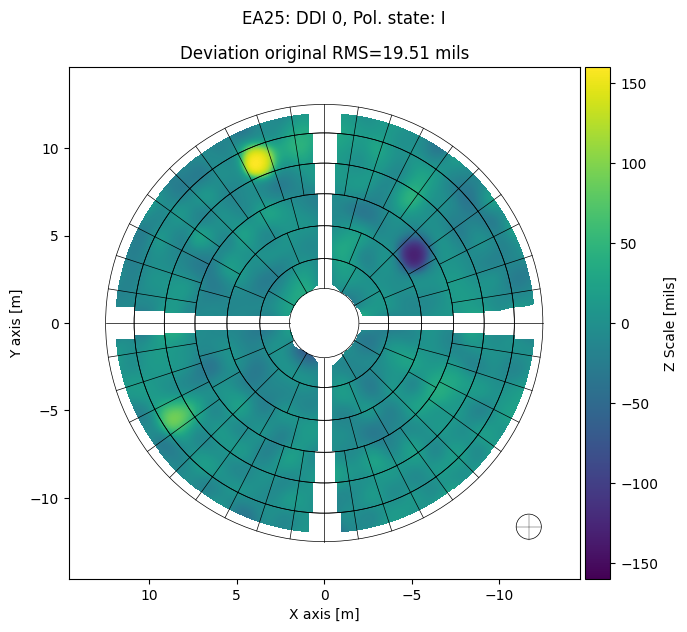
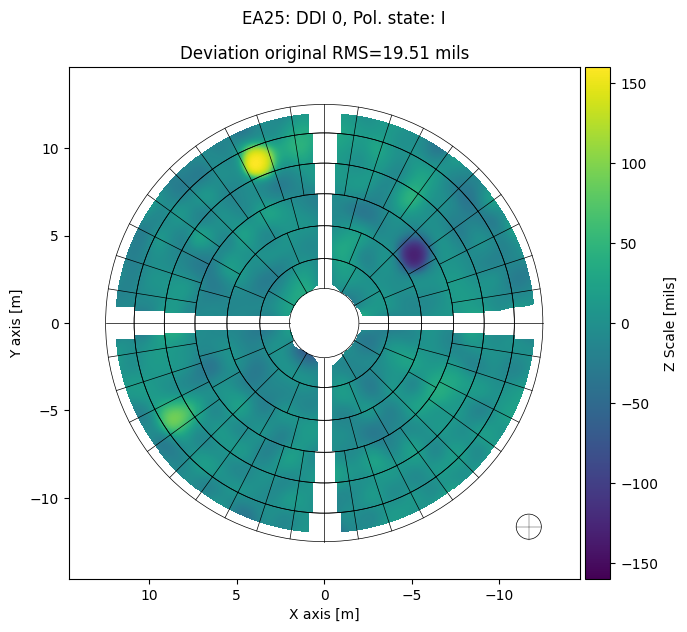
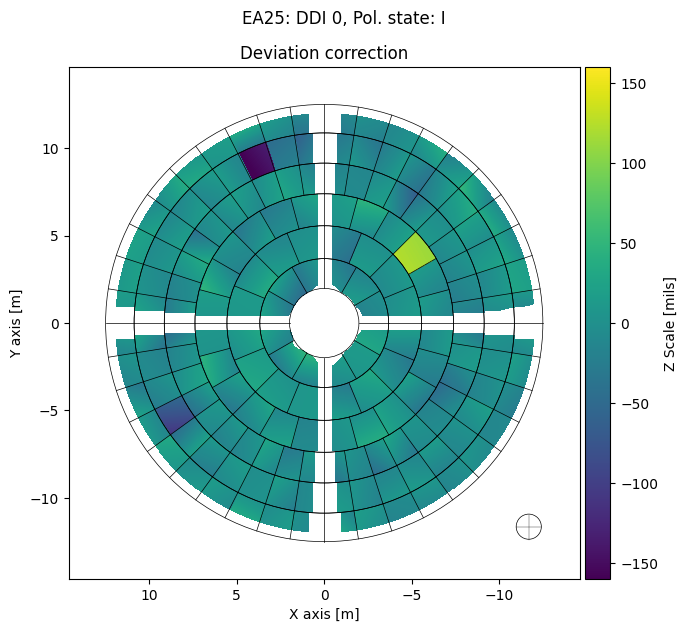
Here we make a first call to plot_antennas to plot only the deviations for a single antenna and DDI for brevity, and then a second call to produce all possible plots for all the antennas and DDIs present in the panel_mds. The deviation plots shown below serve to ilustrate the current state of the antenna surface, the proposed corrections to it, and the estimated residuals after the correction is applied to the antenna.
[32]:
panel_mds.plot_antennas(
    panel_exports,  # Directory to contain the plot and text file
    ant="ea25",  # Plotting Antenna ea25
    ddi=0,  # Plotting DDI 0
    plot_type="deviation",  # Do deviation plots only
    deviation_unit="mils",  #
    plot_screws=False,  # Not plotting screw positions
    parallel=False,  # Don't do plots in parallel
    display=True,  # Display plots below
)
[33]:
panel_mds.plot_antennas(
    panel_exports,  # Directory to contain the plot and text file
    ant="all",  # Plotting all antennas
    ddi="all",  # Plotting all DDIs
    plot_type="all",  # Do all possible plots
    plot_screws=False,  # Not plotting screw positions
    parallel=parallel,  # Do plots in parallel
    display=False,  # Don't Display plots below
)

# All exported files
print("\nCreated files:")

list_directory_files(panel_exports + "/panel_mask*.png")
list_directory_files(panel_exports + "/panel_amplitude*.png")
list_directory_files(panel_exports + "/panel_deviation*.png")
list_directory_files(panel_exports + "/panel_phase*.png")
Created files:
panel_exports/panel_mask_ant_ea25_ddi_0.png
panel_exports/panel_mask_ant_ea25_ddi_1.png
panel_exports/panel_mask_ant_ea06_ddi_0.png
panel_exports/panel_mask_ant_ea06_ddi_1.png
panel_exports/panel_amplitude_ant_ea25_ddi_0.png
panel_exports/panel_amplitude_ant_ea25_ddi_1.png
panel_exports/panel_amplitude_ant_ea06_ddi_0.png
panel_exports/panel_amplitude_ant_ea06_ddi_1.png
panel_exports/panel_deviation_original_ant_ea25_ddi_1.png
panel_exports/panel_deviation_original_ant_ea25_ddi_0.png
panel_exports/panel_deviation_correction_ant_ea06_ddi_1.png
panel_exports/panel_deviation_residual_ant_ea06_ddi_0.png
panel_exports/panel_deviation_residual_ant_ea06_ddi_1.png
panel_exports/panel_deviation_correction_ant_ea06_ddi_0.png
panel_exports/panel_deviation_original_ant_ea06_ddi_1.png
panel_exports/panel_deviation_original_ant_ea06_ddi_0.png
panel_exports/panel_deviation_correction_ant_ea25_ddi_1.png
panel_exports/panel_deviation_residual_ant_ea25_ddi_0.png
panel_exports/panel_deviation_residual_ant_ea25_ddi_1.png
panel_exports/panel_deviation_correction_ant_ea25_ddi_0.png
panel_exports/panel_phase_correction_ant_ea25_ddi_1.png
panel_exports/panel_phase_correction_ant_ea25_ddi_0.png
panel_exports/panel_phase_residual_ant_ea06_ddi_0.png
panel_exports/panel_phase_residual_ant_ea06_ddi_1.png
panel_exports/panel_phase_original_ant_ea25_ddi_1.png
panel_exports/panel_phase_original_ant_ea25_ddi_0.png
panel_exports/panel_phase_correction_ant_ea06_ddi_1.png
panel_exports/panel_phase_correction_ant_ea06_ddi_0.png
panel_exports/panel_phase_residual_ant_ea25_ddi_0.png
panel_exports/panel_phase_residual_ant_ea25_ddi_1.png
panel_exports/panel_phase_original_ant_ea06_ddi_1.png
panel_exports/panel_phase_original_ant_ea06_ddi_0.png
Screw adjustments
If we are satisfied with the proposed corrections we can then export them as a txt file and an acompaining helper plot. This can be done with the panel_mds method export_screws. Here we cover a single antenna and DDI for brevity.
[34]:
panel_mds.export_screws(
    panel_exports,  # Directory to contain the plot and text file
    unit="mils",  # Unit to express screw adjustments in plots and texts
    threshold=25,  # Threshold in mils for significant adjustments
    display=True,  # Display plot below
    ant="ea25",  # Export screw adjustments for antenna ea25
    ddi=0,  # Export screw adjustments for ddi 0
)
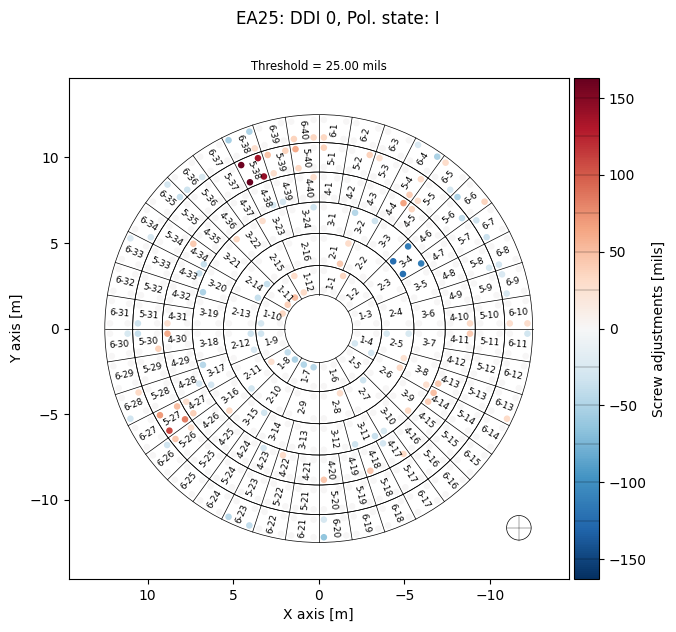
Below we show an example of a txt file produced by export_screws
[35]:
display_text_file(panel_exports + "/panel_screws_ant_ea25_ddi_0.txt", 30)
# Screw adjustments for VLA's EA25: DDI 0, pol. state I
# Frequency = 14.1670 GHz
# Antenna surface RMS before adjustment: 19.51 mils or 0.50 mm
# Antenna surface RMS after adjustment: 8.51 mils or 0.22 mm
# Lower means away from subreflector
# Raise means toward the subreflector
# LOWER the panel if the number is POSITIVE
# RAISE the panel if the number is NEGATIVE
# Adjustments are in mils

# Panel      il        ir        ol        or    Fallback    Model
  1-1    -10.15      5.23      6.41     35.17      no       rigid
  1-2     -9.73    -17.33     16.72      2.51      no       rigid
  1-3     17.02     20.46      1.26      7.70      no       rigid
  1-4    -21.05    -29.22    -12.84    -28.12      no       rigid
  1-5    -16.01    -11.11    -15.55     -6.39      no       rigid
  1-6    -20.53    -13.91     -2.26     10.12      no       rigid
  1-7    -46.84    -47.79     12.65     10.88      no       rigid
  1-8    -50.32    -39.71      6.38     26.22      no       rigid
  1-9     21.36      3.45      1.04    -32.45      no       rigid
 1-10     21.61     34.16    -26.98     -3.51      no       rigid
 1-11     38.75     50.63    -21.05      1.18      no       rigid
 1-12     30.67      4.03     29.65    -20.17      no       rigid
  2-1     23.35     42.07      1.05     29.34      no       rigid
  2-2    -12.51    -14.84      1.97     -1.55      no       rigid
  2-3      8.28      6.17     -8.19    -11.38      no       rigid
  2-4      2.96     -1.65     -8.90    -15.87      no       rigid
  2-5    -26.17      7.63    -26.02     25.07      no       rigid
  2-6      9.06    -11.70     31.87      0.49      no       rigid
  2-7    -33.20    -17.82    -19.43      3.82      no       rigid
Exporting panel data to FITS
As with the image_mds data it may be convenient to export the data arrays in a panel_mds to FITS files. This can be acomplished with the method export_to_fits. As before we export all the data in the panel_mds, display a list of the produced files and an example header of one of the created files.
[36]:
panel_mds.export_to_fits(
    panel_exports,  # Directory to contain FITS files
    ant="all",  # Export all antennas
    ddi="all",  # Export all DDIs
    parallel=parallel,  # Export FITS files in parallel
)

# All exported files
print("\nCreated files:")

list_directory_files(panel_exports + "/panel*.fits")
[2026-06-08 16:30:52,726]     INFO    worker_1:  Exporting panel contents of ant_ea06 ddi_1 to FITS files in panel_exports
[2026-06-08 16:30:52,729]     INFO    worker_0:  Exporting panel contents of ant_ea06 ddi_0 to FITS files in panel_exports
[2026-06-08 16:30:52,732]     INFO    worker_3:  Exporting panel contents of ant_ea25 ddi_1 to FITS files in panel_exports
[2026-06-08 16:30:52,736]     INFO    worker_2:  Exporting panel contents of ant_ea25 ddi_0 to FITS files in panel_exports

Created files:
panel_exports/panel_deviation_original_ant_ea06_ddi_1.fits
panel_exports/panel_amplitude_ant_ea25_ddi_1.fits
panel_exports/panel_phase_correction_ant_ea06_ddi_0.fits
panel_exports/panel_deviation_original_ant_ea25_ddi_0.fits
panel_exports/panel_phase_correction_ant_ea25_ddi_1.fits
panel_exports/panel_amplitude_ant_ea06_ddi_0.fits
panel_exports/panel_amplitude_ant_ea06_ddi_1.fits
panel_exports/panel_phase_correction_ant_ea25_ddi_0.fits
panel_exports/panel_deviation_original_ant_ea25_ddi_1.fits
panel_exports/panel_phase_correction_ant_ea06_ddi_1.fits
panel_exports/panel_amplitude_ant_ea25_ddi_0.fits
panel_exports/panel_deviation_original_ant_ea06_ddi_0.fits
panel_exports/panel_deviation_correction_ant_ea06_ddi_1.fits
panel_exports/panel_phase_residual_ant_ea25_ddi_0.fits
panel_exports/panel_phase_residual_ant_ea06_ddi_1.fits
panel_exports/panel_deviation_correction_ant_ea25_ddi_0.fits
panel_exports/panel_phase_residual_ant_ea06_ddi_0.fits
panel_exports/panel_deviation_correction_ant_ea25_ddi_1.fits
panel_exports/panel_deviation_correction_ant_ea06_ddi_0.fits
panel_exports/panel_phase_residual_ant_ea25_ddi_1.fits
panel_exports/panel_deviation_residual_ant_ea25_ddi_1.fits
panel_exports/panel_deviation_residual_ant_ea06_ddi_0.fits
panel_exports/panel_deviation_residual_ant_ea06_ddi_1.fits
panel_exports/panel_deviation_residual_ant_ea25_ddi_0.fits
panel_exports/panel_phase_original_ant_ea06_ddi_0.fits
panel_exports/panel_mask_ant_ea25_ddi_1.fits
panel_exports/panel_mask_ant_ea06_ddi_0.fits
panel_exports/panel_phase_original_ant_ea25_ddi_1.fits
panel_exports/panel_phase_original_ant_ea25_ddi_0.fits
panel_exports/panel_mask_ant_ea06_ddi_1.fits
panel_exports/panel_mask_ant_ea25_ddi_0.fits
panel_exports/panel_phase_original_ant_ea06_ddi_1.fits
[37]:
# Antenna ea06 DDI 0 deviation residual FITS header
from astropy.io import fits

hdul = fits.open(panel_exports + "/panel_deviation_residual_ant_ea06_ddi_0.fits")
print(repr(hdul[0].header))
SIMPLE  =                    T / conforms to FITS standard
BITPIX  =                  -64 / array data type
NAXIS   =                    2 / number of array dimensions
NAXIS1  =                  510
NAXIS2  =                  510
EXTEND  =                    T
PMODEL  = 'rigid   '
PMARGIN =                  0.2
CLIP    =    0.637374654991791
TELESCOP= 'ea06    '
INSTRUME= 'VLA     '
WAVELENG= 0.021161322651231735
FREQUENC=        14167000000.0
WCSAXES =                    2
CRVAL1  =  0.02872242647058928
CDELT1  = -0.05744485294117751
CRPIX1  =                255.0
CROTA1  =                  0.0
CTYPE1  = 'X----LIN'
CUNIT1  = 'm       '
CRVAL2  = -0.02872242647058928
CDELT2  = 0.057444852941177516
CRPIX2  =                255.0
CROTA2  =                  0.0
CTYPE2  = 'Y----LIN'
CUNIT2  = 'm       '
BMAJ    =   1.4366515837104072
BMIN    =   1.4366515837104072
BPA     =                  0.0
BUNIT   = 'm       '
TYPE    = 'Deviation residuals'
ORIGIN  = 'Astrohack v1.0.2: panel'
DATE    = 'Jun 08 2026, 16:30:53'
Checking gain improvements
One important measure of antenna performance and panel adjustment sucess is the gain estimate derived from the aperture phases. Gain tables for the antennas for which holography was done can be obtained by using the export_gain_tables method of the panel_mds objects.
[38]:
panel_mds.export_gain_tables(
    panel_exports,  # Directory to contain gain tables
    ant="all",  # Export all antennas
    ddi="all",  # Export all DDIs
    parallel=parallel,  # Export ASCII files in parallel
)
[39]:
display_text_file(panel_exports + "/panel_gains_ant_ea25_ddi_0.txt")
# Gain estimates for VLA antenna ea25
# Based on a measurement at 14.1670 GHz, 2.12 cm
# Antenna surface RMS before adjustment: 0.50 mm
# Antenna surface RMS after adjustment: 0.22 mm

+-------------+------------+--------------+-------------+------------------+
|  Frequency  | Wavelength | Before panel | After panel | Theoretical Max. |
+-------------+------------+--------------+-------------+------------------+
|  1.4990 GHz |  20.00 cm  |   31.96 dB   |   31.96 dB  |     31.96 dB     |
|  2.3061 GHz |  13.00 cm  |   33.83 dB   |   33.83 dB  |     33.83 dB     |
|  4.9965 GHz |  6.00 cm   |   37.17 dB   |   37.19 dB  |     37.19 dB     |
|  9.9931 GHz |  3.00 cm   |   40.13 dB   |   40.19 dB  |     40.20 dB     |
| 14.9896 GHz |  2.00 cm   |   41.81 dB   |   41.93 dB  |     41.96 dB     |
| 23.0610 GHz |  1.30 cm   |   43.52 dB   |   43.76 dB  |     43.83 dB     |
| 29.9792 GHz |  1.00 cm   |   44.52 dB   |   44.86 dB  |     44.97 dB     |
| 42.8275 GHz |  7.00 mm   |   45.78 dB   |   46.31 dB  |     46.52 dB     |
+-------------+------------+--------------+-------------+------------------+
[40]:
if parallel:
    client.close()